
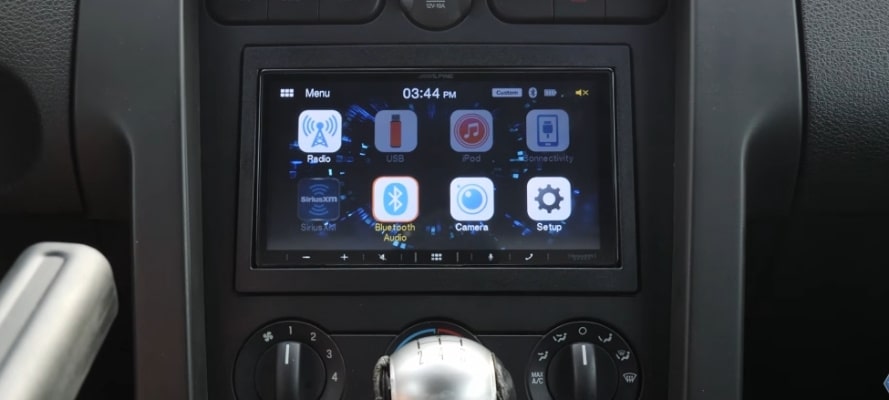
Most guides on choosing a double DIN head unit lead with the same feature bullets: screen size, wattage, Bluetooth. Those are surface specs. What actually determines whether a unit fits your dash, works with your amplifier, and integrates with your vehicle sits further down the spec sheet, and that is exactly what we'll guide here. Eight decision points, in the order they actually matter: dash fit and chassis depth, display type, CarPlay and Android Auto, preout voltage, audio tuning depth, iDatalink Maestro compatibility, budget, and brand.
Table of Contents
Step 1: Confirm Your Dash Supports a Double DIN
First on the list: confirm your dash opening can physically accept a double DIN unit. In our experience, buying the wrong size is the most avoidable and most common mistake in a head unit upgrade.
Measure Your Dash Opening
A double DIN slot measures 4 inches tall by 7 inches wide. Remove your current unit, grab a tape measure, and check both numbers before you start browsing. If your current unit is 2 inches tall, you have a single DIN slot. our car stereo slot size identification steps guides the process for every format.
Measure Chassis Depth
Chassis depth is the spec most buyers miss. Standard units run 5 to 7 inches deep behind the dash. Vehicles with tight HVAC modules, compact engine bays, or older Japanese and European designs are the most common fitment problems. The cavity behind the stereo opening is simply too shallow for a standard-depth chassis. Shallow-chassis units go as low as 2.4 inches and resolve this without modification. Measure the cavity depth from the face of the opening to the first obstruction before you set a budget. That single measurement eliminates more poor buying decisions than any other spec check.
Using an Online Fit Guide
Most retailers online offer vehicle-specific fit guides. Enter your year, make, and model and the tool returns compatible units alongside the required dash kit and wiring harness adapter. Use this before shortlisting any model. It eliminates fitment guesswork before you spend anything.
Step 2: Choose Your Display Type
With your dash opening and chassis depth confirmed, your next decision is display type. Not all double DIN units use the same screen format, and the right type depends on your dash layout and how much screen you want.
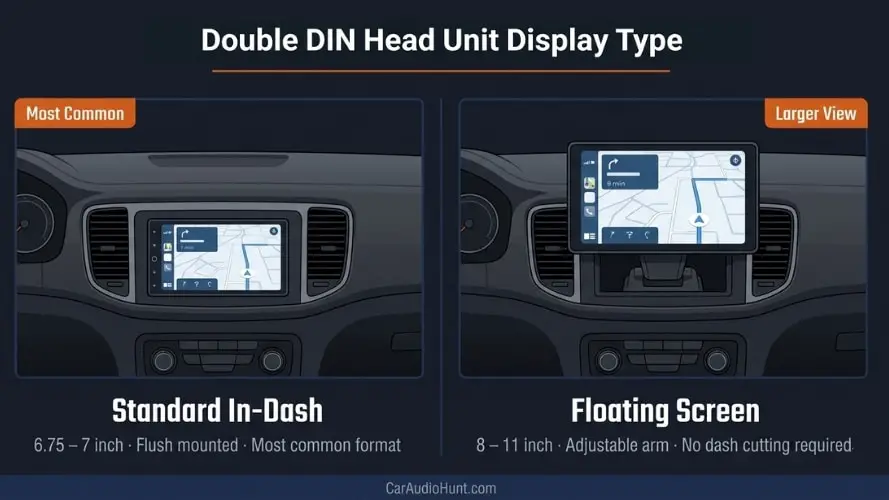
Standard In-Dash Touchscreen
It's the most common screen type for car stereo. The screen sits within the DIN opening, typically between 6.75 and 7 inches. The key distinction is capacitive versus resistive. Capacitive panels respond to a light touch and are visually sharper. Resistive screens require more pressure and feel dated by comparison. In our opinion, capacitive is worth the price step up in nearly every case, and most units above $150 from major top brands already default to it.
Floating Screen Receivers
Floating screen units mount on an adjustable arm outside the DIN slot, allowing for larger displays, typically 8 to 11 inches, without cutting the dash. They come in both single DIN and double DIN chassis configurations.
Choose this type if your dash cavity is too shallow for a standard unit or if you want more screen than any in-dash unit can provide. It is the configuration we point buyers toward most often when a vehicle's factory dash simply cannot accommodate what they actually want.
Step 3: Decide on CarPlay and Android Auto
With display type settled, the next decision most buyers spend real time on is connectivity. CarPlay and Android Auto are the features people compare most carefully when choosing a double DIN car stereo. If you use your phone for navigation, music, or hands-free calling while driving, both platforms cover all of that through the head unit screen. If your commute is short and your listening habits are simple, reliable Bluetooth is enough for you. CarPlay and Android Auto typically add $50 to $100 over a comparable Bluetooth-only unit at the same spec level.
Wired vs Wireless
Wired CarPlay connects via USB, charges your phone, and delivers a stable connection in all environments. Wireless connects over Wi-Fi and Bluetooth, reconnects automatically on startup, and removes the cable. In our experience, wired remains the more dependable default for long drives, while wireless earns its premium on short, frequent trips where the convenience matters more than the marginal latency. For the full picture on latency, battery impact, and daily use, our wired and wireless CarPlay comparison explores both options in detail.
Which Brands Include CarPlay
Most major brands include CarPlay across models above $120 — Pioneer, Kenwood, Alpine, Sony, and JVC are the ones consistently worth prioritising for build quality and long-term iOS support.
Budget brands like BOSS Audio and JENSEN offer it at lower price points with drawbacks in build quality and audio tuning. Look for the word "certified" in the listing, not just "compatible," to confirm Apple's official verification for long-term iOS support on your unit.
Step 4: Understand Preout Voltage
With connectivity decided, the next factor worth understanding, even if you end up skipping it entirely, is preout voltage. Preouts are the RCA connections on the rear of the head unit that send an unamplified signal to an external amplifier. The voltage rating (2V, 4V, or 5V) determines how clean and strong that signal is. Higher voltage means the amplifier needs less gain to reach usable output, keeping the noise floor lower and the audio cleaner.
If you are not adding an external amplifier, preout voltage has no bearing on your decision. If you are building an amplified system now or planning to later, prioritize 4V or 5V from the start. A weak 2V signal forces the amplifier to run at a higher gain just to reach the same output level, and that compensation is where most of the background hiss in amateur builds actually comes from. This is the spec buyers most often wish they had prioritized from the beginning. our preout voltage detail guide explains how voltage affects amplifier gain and noise floor.
Step 5: Evaluate Audio Tuning Depth
With preout voltage addressed, the related factor is how much audio tuning control the unit actually gives you. Most buyers select one tier of tuning depth above what their actual setup requires. Match the depth to how you actually listen rather than buying tools you will never configure.
Step 6: Check iDatalink Maestro Compatibility
Audio tuning shapes how the unit sounds. iDatalink Maestro determines whether your factory features still work after the swap. It is a wiring module that lets an aftermarket head unit communicate with your vehicle's factory systems, retaining steering wheel audio controls, OEM cameras, and vehicle data displays after the install. Most post-2010 vehicles with CAN-bus electronics need it. Without Maestro, factory steering wheel buttons and backup cameras stop working after the swap.
Not all head units support Maestro. Only specific models from top brands carry the compatibility. On GM, Ford, and Ram platforms specifically, skipping Maestro can also trigger dashboard warning lights and drop speedometer data from the head unit. Verify your vehicle and head unit at idatalink.com using the Weblink tool before purchasing. This step prevents more post-install problems than any other pre-purchase check. our full iDatalink Maestro explainer details SR, RR, and ADS-MRR module types in full.
Step 7: Match Your Budget to the Right Tier
With the technical factors addressed, fitting all of it to a budget is the last step before you look at specific brands. Understanding what each price tier includes before setting a ceiling is the most practical double DIN buying advice you will get. Features step up at specific thresholds, not gradually.
Step 8: Choose the Right Brand for Your Needs
Brand selection is one of the most consequential calls in a double DIN upgrade. The market spans flagship lines from Pioneer, Kenwood, and Alpine through mid-range options from Sony and JVC, down to budget names like BOSS, Jensen, and Atoto at the entry level. For any build with expansion potential or CarPlay in the picture, these five are where we focus the shortlist.
Pioneer and Kenwood offer the broadest selection across every budget and use case in this market, with consistent options from entry-level to flagship. Alpine brings engineering precision and installation flexibility where other brands fall short. Sony and JVC are the reliable mid-range picks, covering the widest range of vehicles and everyday setups at a competitive price.
Match the brand to your build requirement first, then compare models within that brand before setting a final budget.
Conclusion
Most head unit upgrades that go wrong do not come down to a wrong brand choice or a missed feature. They come down to a unit that did not fit the dash, an amplifier running high gain on a signal the buyer never checked, or a Maestro module skipped in a vehicle that needed it. The decisions that matter most in this purchase are rarely the obvious ones.
The right double DIN head unit exists at almost every price point. What changes with budget is the depth of what is available, not the quality of the outcome. Match the specs to your actual use case rather than the ceiling of your budget, and the unit earns its place in the dash for years.
Ready to shortlist? Browse our top double DIN head unit picks for 2026 — reviewed across every budget and build type.
Frequently Asked Questions
What is the most important spec to check in a double DIN head unit?
Chassis depth first. It determines whether the unit physically fits your dash. Then preout voltage if you are adding an amplifier. Then CarPlay connection type based on your daily driving preference.
Do I need iDatalink Maestro for my car?
Most post-2010 vehicles with factory steering wheel audio controls or OEM backup cameras will need it after a head unit swap. Check the iDatalink Weblink tool at idatalink.com with your year, make, and model before purchasing.
Is CarPlay more important than preout voltage?
Depends on your setup. CarPlay matters for daily smartphone use. Preout voltage matters only if you are connecting an external amplifier. Running stock speakers with no amp planned makes preout voltage irrelevant.
What is the best double DIN head unit for an amplified system?
Prioritize 4V or 5V preouts alongside a 13-band EQ with digital time alignment. The Kenwood eXcelon DMX709S delivers both. It is the unit we recommend first for amplifier builds at this price range.
Can I install a double DIN head unit without a dash kit?
Not recommended. A vehicle-specific dash kit fills the surround gap and gives a clean factory-finish result. Without it the unit sits loose and the gap around the face is left exposed.
Recommended Next Reads: