
If you’re researching head units and can’t find a clear answer on what iDatalink Maestro is or whether your installation actually requires it, that’s a gap worth closing before you spend anything. Most product listings mention Maestro compatibility without explaining what the module does or what stops working without it. That’s why we are guiding you through how Maestro works, which module variant applies to your vehicle, and how to decide whether it belongs in your budget.
Table of Contents
What Is iDatalink Maestro?
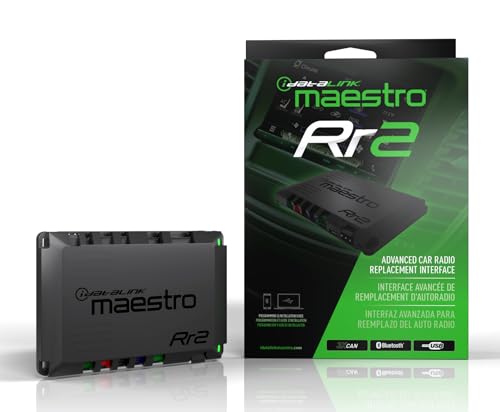
iDatalink Maestro is a small wiring module made by Directed Electronics, the parent company of the iDatalink brand. It works as a communication bridge between an aftermarket head unit and your vehicle's CAN-bus data network.
In modern vehicles, the factory head unit is not a standalone component. It connects directly to the CAN-bus system, a digital data network that links steering wheel controls, factory cameras, OEM amplifiers, and instrument cluster data into a single integrated system. Swap the factory unit for an aftermarket head unit and that network connection breaks. The aftermarket unit has no way to read CAN-bus signals natively. That is what Maestro resolves.
Understanding how iDatalink Maestro works at the configuration level starts with the Weblink programming tool at idatalink.com. The module itself is compact, roughly the size of a matchbox, and connects inline between the vehicle's factory harness and the new head unit. Weblink generates a vehicle-specific wiring diagram and handles module programming through a browser before the unit goes into the dash.
What Does iDatalink Maestro Do?
Maestro is not a single-function adapter. Depending on the module variant and your vehicle, it restores several factory features that disconnect the moment a new head unit replaces the original. Here’s what it does.
1. Steering Wheel Control Retention
Most modern vehicles have audio controls built into the steering column: volume, track skip, source switching, and sometimes a voice command button. These buttons communicate through the CAN-bus network, not through a simple resistor-based signal an aftermarket unit can read on its own. iDatalink Maestro steering wheel control retention works by decoding that CAN-bus data and translating it into a format the aftermarket head unit understands, restoring full button function without a separate adapter.
A PAC module does the same steering wheel control job in some installs, but Maestro integrates more deeply with compatible head units from top brands and extends well beyond SWC retention into vehicle data and camera integration.
2. Factory Camera Integration
Vehicles with factory-installed backup cameras route the video feed through the OEM head unit. After a swap without Maestro, that signal has no path to the new screen. Maestro passes the factory camera feed through to the aftermarket unit's camera input, keeping the OEM camera functional without requiring an aftermarket replacement.
3. Vehicle Data Display
On compatible vehicle and head unit combinations, Maestro surfaces vehicle information on the aftermarket screen: speed, engine RPM, coolant temperature, battery voltage, door ajar warnings, and fuel level. Data that previously appeared through OEM menus becomes accessible again through the aftermarket display. The specific data points available vary by make and model.
4. OEM Amplifier Compatibility
Many vehicles leave the factory with a branded amplifier: Bose in GM vehicles, JBL in Toyota and Honda, Bang and Olufsen in select European platforms. These factory amps receive their signal from the OEM head unit through digital or optical connections rather than standard RCA preouts. Replace the head unit without accounting for the factory amp and the speakers go quiet or perform well below capability. The Maestro AR module handles this by enabling the aftermarket head unit to interface with those factory amplifier systems.
iDatalink Maestro Module Types: SR vs RR vs AR vs ADS-MRR
Not every install requires the same module. The right variant depends on your vehicle and what factory features you are keeping. Knowing the difference between iDatalink Maestro SR and Maestro RR is where most buyers need clarity before purchasing.
Module | What It Covers | Best For |
|---|---|---|
Maestro SR | Steering wheel control retention, basic CAN-bus integration | Standard installs in post-2010 vehicles with simpler factory systems |
Maestro RR | Steering wheel controls + vehicle data display + OEM camera passthrough + full integration | Trucks and modern vehicles with complete factory feature sets |
Maestro AR | Factory amplifier retention | Vehicles with Bose, JBL, or other branded OEM amp systems |
ADS-MRR | Full multimedia retention for highly integrated OEM systems | Complex factory multimedia platforms with extensive digital integration |
Our Recommendation: the RR is the right call for most car owners and drivers of post-2015 vehicles where factory features are tightly interconnected. The SR is sufficient for installs where steering wheel control retention is the only priority.

Which Vehicles Need iDatalink Maestro?
Most iDatalink Maestro compatible vehicles fall into the post-2010 bracket, where CAN-bus electronics tie factory features to the OEM head unit in ways a standard aftermarket swap will break. Any vehicle equipped with factory steering wheel controls, a stock backup camera, or a branded OEM amplifier typically requires this setup.
The makes and model years most commonly requiring Maestro include:
- Ford and Lincoln (2011 and newer, including the F-150, Explorer, and Fusion)
- GM vehicles including Chevrolet, GMC, and Cadillac (2010 and newer)
- Ram (2013 and newer)
- Toyota and Lexus (2012 and newer, JBL-equipped trims in particular)
- Honda and Acura (2013 and newer)
- Subaru (2015 and newer)
Which Head Units Support iDatalink Maestro?
iDatalink Maestro compatible head units come from a short list of top major brands, and not every model within those brands carries support. Compatibility depends on specific model hardware and firmware, not just the manufacturer name. Here are the list of some head units from top 5 brands that support iDatalink Maestro.
The word "compatible" in a product listing is not sufficient on its own. Verify the specific model number against the Weblink tool before purchasing. A head unit that fits your vehicle well can still lack Maestro support at the firmware level, and that detail will not appear in any feature bullet list.
For a full breakdown of which models support Maestro alongside the strongest audio specs, Our 2026 double DIN receiver comparison features each option in detail.
How Much Does iDatalink Maestro Cost?
Pricing varies by module. The Maestro SR runs between $40 and $60. The Maestro RR sits between $80 and $110 depending on the retailer. AR module pricing varies by vehicle application. All three are available on the market.
The Weblink tool handles module programming online before the unit goes in the dash, and the vehicle-specific wiring diagram it generates is detailed enough for any driver already comfortable with a head unit upgrade.
Is iDatalink Maestro worth it? For any post-2010 vehicle with factory steering wheel controls or an OEM camera, yes. Skipping the module to save $50 to $100 and losing those features permanently is the wrong trade-off.
Do You Need iDatalink Maestro?
Whether Maestro belongs in your install depends on your vehicle's age, which factory features matter to you, and whether your chosen head unit supports it.
You need Maestro if:
- Your vehicle is a 2010 or newer model with CAN-bus electronics
- You want factory steering wheel audio controls to keep working
- You are retaining the OEM backup camera
- Your vehicle has a branded factory amplifier (Bose, JBL, Bang and Olufsen)
- Your vehicle data or dash warning system ties into the head unit
You can skip Maestro if:
- Your vehicle predates CAN-bus integration (generally pre-2005)
- Your factory stereo has no steering wheel audio controls
- You are replacing the OEM camera with an aftermarket unit
- Your vehicle has a simple factory audio system with no external amplifier
If you want the bigger picture on how Maestro compatibility fits into your decision, our complete double DIN buying guide breaks it down along with every other factor worth checking before you buy.
Frequently Asked Questions
Does my car need iDatalink Maestro?
If your vehicle is a 2010 or newer model with factory steering wheel audio controls, an OEM backup camera, or a branded factory amplifier, it almost certainly does. Confirm using the iDatalink Weblink tool at idatalink.com with your year, make, and model.
Will my steering wheel controls stop working without Maestro?
In most post-2010 vehicles, yes. Steering wheel audio buttons communicate through the CAN-bus system, and an aftermarket head unit cannot read that signal without Maestro or a separate SWC adapter. Older vehicles with resistor-based SWC wiring are the exception.
Can I install iDatalink Maestro myself?
Yes. The Weblink tool generates a vehicle-specific wiring diagram and handles module programming online before the unit goes in the dash. Drivers already comfortable with a basic head unit swap will manage the Maestro addition without professional help.
Does iDatalink Maestro work with all aftermarket head units?
No. Maestro support is limited to specific models from top brands. Verify your target model against the Weblink tool before purchasing, since not every model within a compatible brand carries Maestro support at the firmware level.
Is Maestro SR or RR better for my install?
Recommended next reads to find Maestro-compatible head units by brand: